A configurable operating platform for residential property portfolios

Configurable infrastructure that scales to your processes.

We don’t force you into a predefined framework. Elastrum adapts its architecture to suit your unique processes, property management workflows, invoicing rules and operational objectives.

Designed for residential operators managing complex, multi-property portfolios.

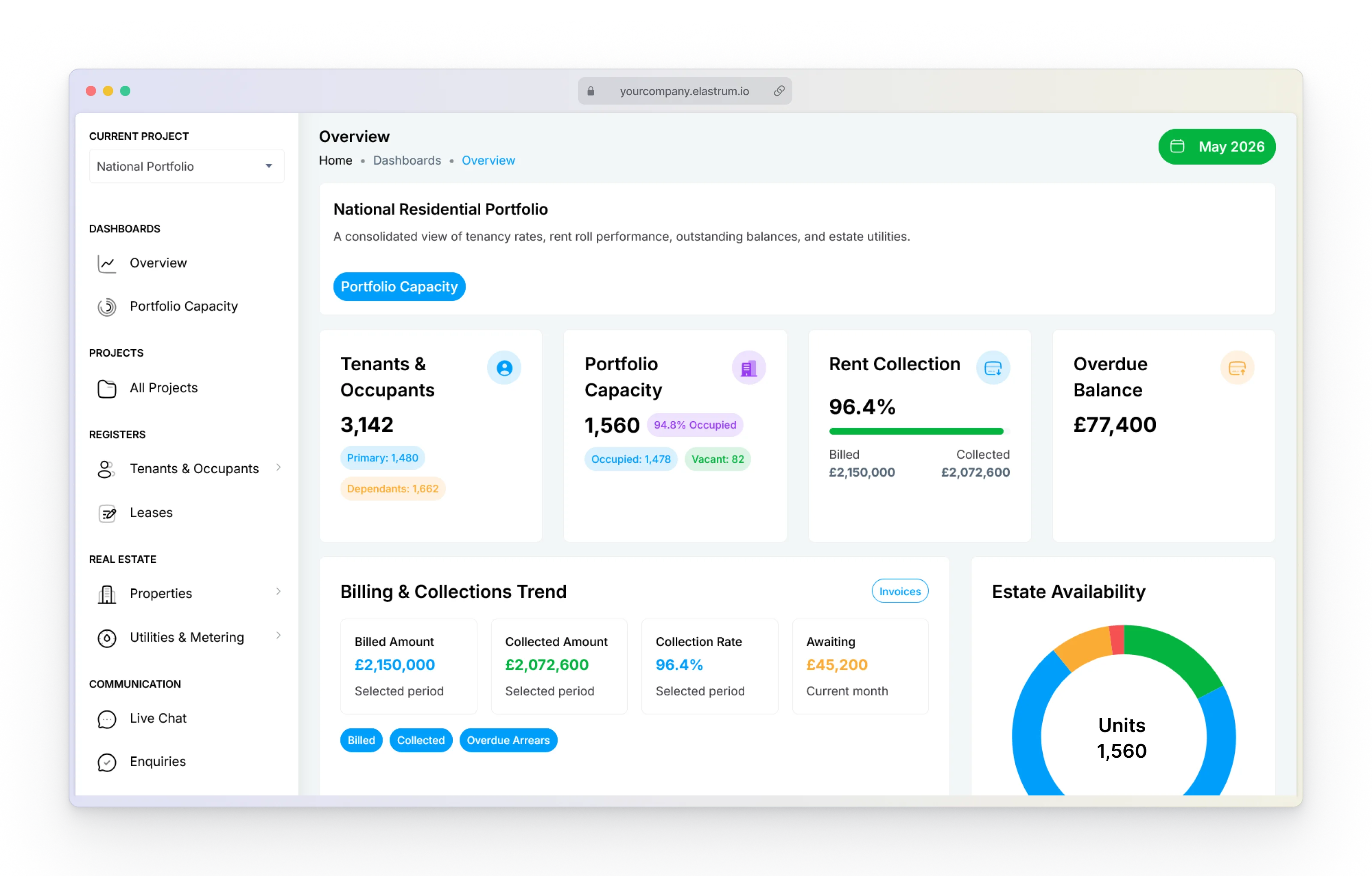
Elastrum property portfolio dashboard with location filters and residential properties
01
One governed property recordOne controlled model connects your portfolio, units, residents, meters and operational data.
02
Traceable billing workflowsReadings, rules, charges, adjustments and payments follow one auditable process.
03
Clear operational ownershipEvery request, task and decision has a responsible role, current status and complete history.

No single portfolio-wide hierarchy

Stop forcing every property into the same hierarchy.

Most property systems force every asset into the same hierarchy. Elastrum lets each project follow its own structure – from multi-stage developments to individual buildings - while billing, maintenance, and resident operations remain connected across the entire portfolio.

Project Builder

Build the structure each project needs

Configure each project around its real property structure and your team’s terminology. Manage individual buildings and complex developments together within one connected portfolio, without forcing them into the same organisational model.

Utility Engine

Billing that follows your structure

Capture meter readings and generate utility invoices in bulk. Apply complex tariff structures automatically, replace manual spreadsheet calculations, and keep a detailed record of charges and adjustments for each resident, linked to the relevant readings and tariffs.

Maintenance Hub

Keep every maintenance workflow in the right context

Link resident requests, maintenance tickets, contractors, and inventory to the exact entity affected. Configure routing and responsibilities, track progress and service history, and keep the relevant property details available as work moves between teams.

Flexible project architecture

Model each project around the structure you actually operate.

Configure each project’s structure and terminology, keeping residents, meters, billing, maintenance, and inventory linked to the relevant property.

01Compare hierarchy depth

Use the right hierarchy for every project.

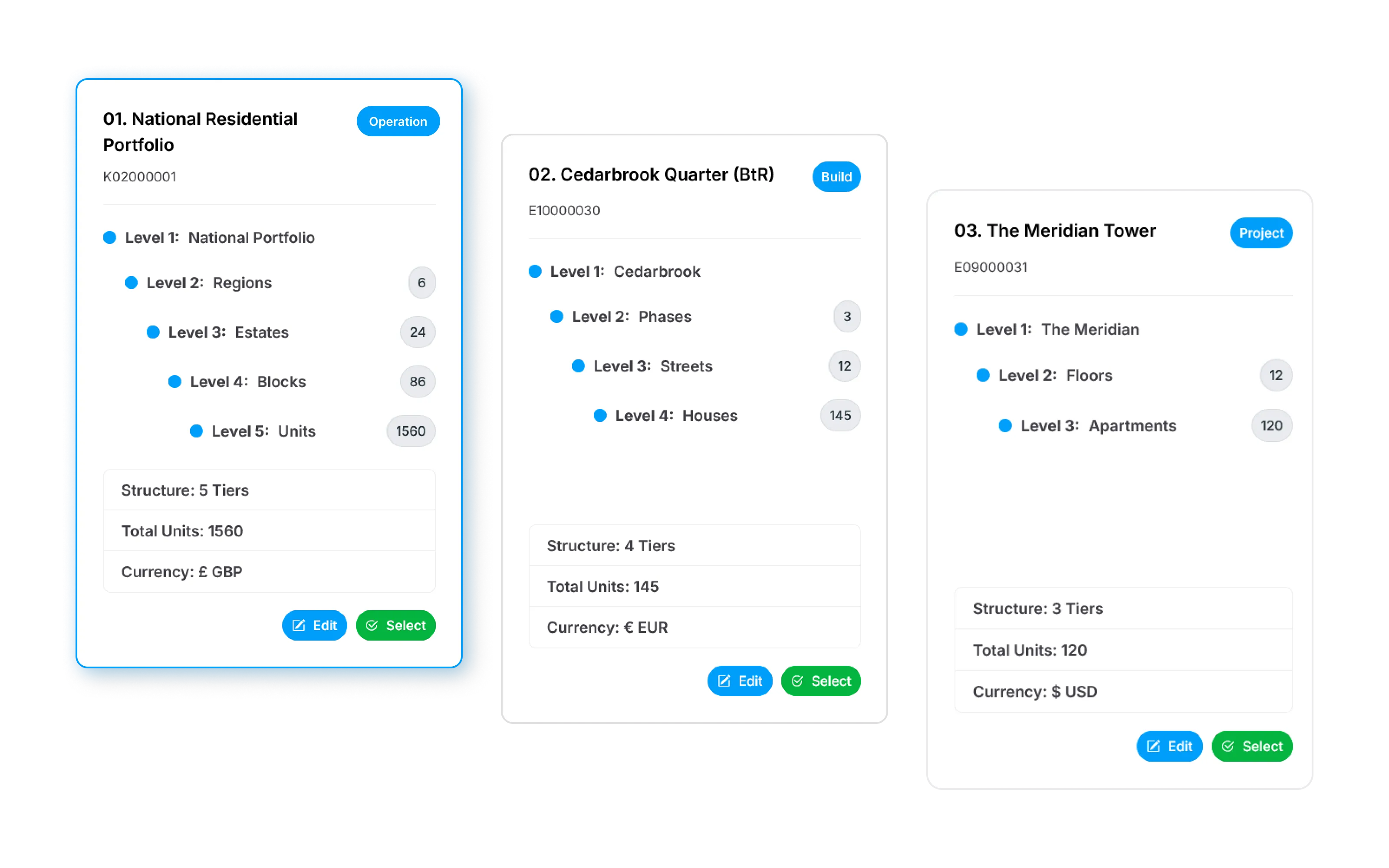
Choose the structural depth that fits each project, from individual buildings to complex multi-stage developments. Different projects can use different structures while remaining part of the same portfolio.

Three residential project cards showing five-, four-, and three-level hierarchies

02Set level labels

Use familiar names for each level.

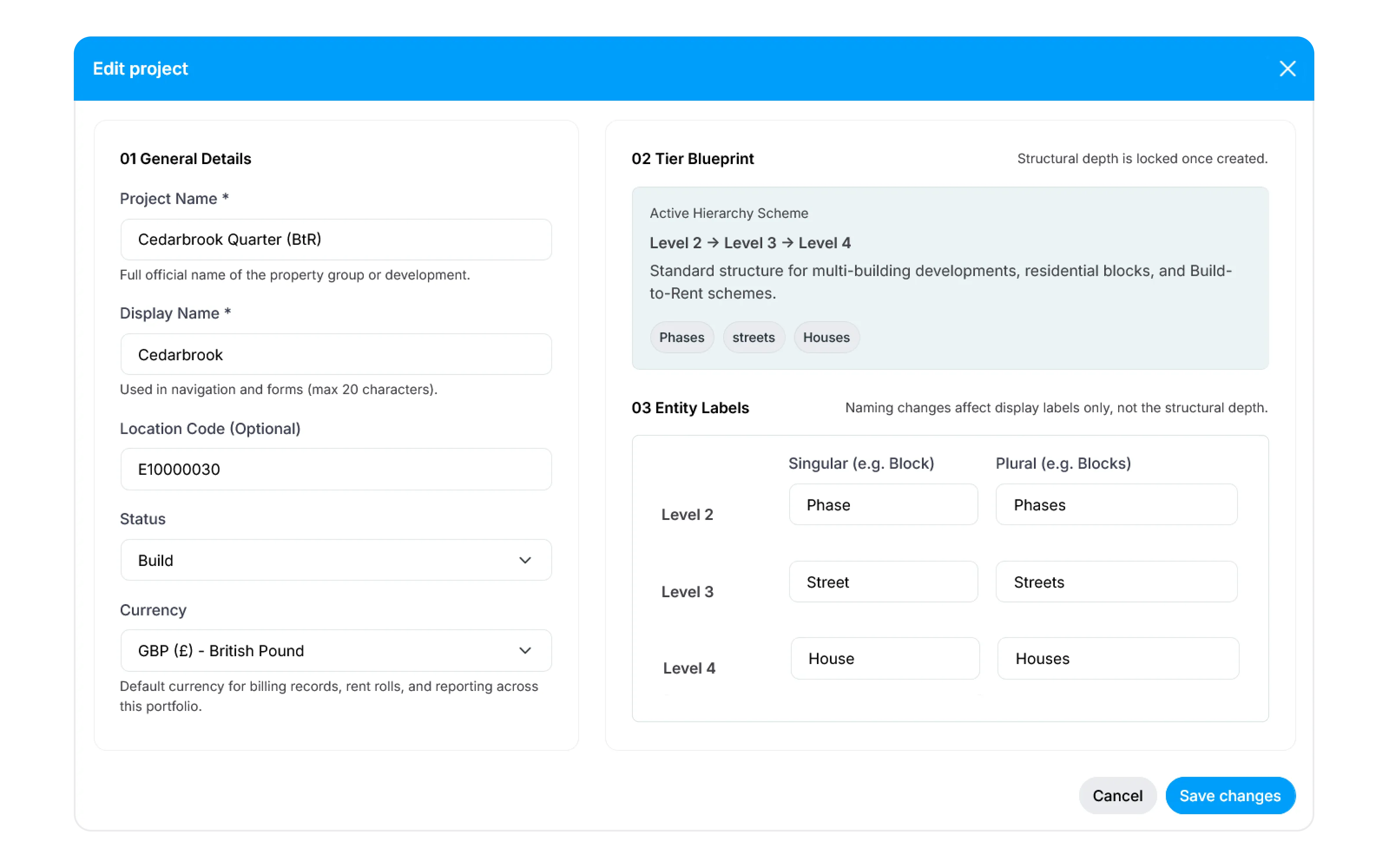
Rename each structural level in singular and plural forms to reflect the language of a specific project. Whether your teams work with stages and phases, estates and plots, or buildings and units, Elastrum keeps the system familiar without changing the underlying architecture.

Project editing form with a hierarchy blueprint and singular and plural labels for phases, streets, and houses

03Keep context connected

Every operational record retains its exact place.

Connect residents, meters, tariffs, invoices, maintenance tickets, and inventory to the relevant level of each project. Every record retains its structural context, allowing teams to trace operations back to the correct property while managing different project models in one system.

Project
Cedarbrook Quarter
Phase
North Phase
Street
Oakleaf Street
Inventory
24 items
Furnished
House
House 14
Agreement
AST #A-492
Active
Residents
J. Smith +1 tenant
Meters
Electricity · Water · Heat
Reading
Auto-sync · 154 kWh
Invoice
£1,450 · Rent + utilities
Payment
Direct Debit
Cleared
Report
Reconciled

Ready to change how your operations work?Make your next moveBook Discovery Call

Start with the operation you have today. Together, we will identify the most useful next step.

Outcomes by role

One system, multiple operational perspectives.

All teams work within the same connected operational context, while role-based permissions give each team access to the data and controls relevant to its responsibilities.

Operations

See the full operational picture

Track project status, active workflows, and team activity in one operational view for each project. Review how work is progressing, coordinate teams, and make informed decisions using current data without waiting for separate departmental updates.

Finance & Billing

Trace every charge to payment

Run bulk billing and trace each charge from meter reading to payment. Incoming payments are automatically allocated where matched, while the complete history separates allocated and unallocated payments and records manual adjustments.

Property Administration

Manage the resident lifecycle

Manage resident records, agreements, occupancy, and lifecycle changes in one place. Every interaction and update remains traceable, giving authorised teams the context needed for daily administration and review.

Maintenance & Facilities

Manage work through to resolution

Turn resident requests into structured maintenance work, assign responsibility, coordinate contractors, and track inventory. Follow status and service history from first report to completion without losing operational context.

Controlled utility billing

From meter readings to reconciled payments - without manual spreadsheet calculations.

Elastrum connects consumption, tariff rules, invoice generation, and payment allocation in one traceable process. Every billing run is validated before issue, and every balance can be followed back to its readings, calculations, and transactions.

01Consumption overview

Review metered usage across utilities.

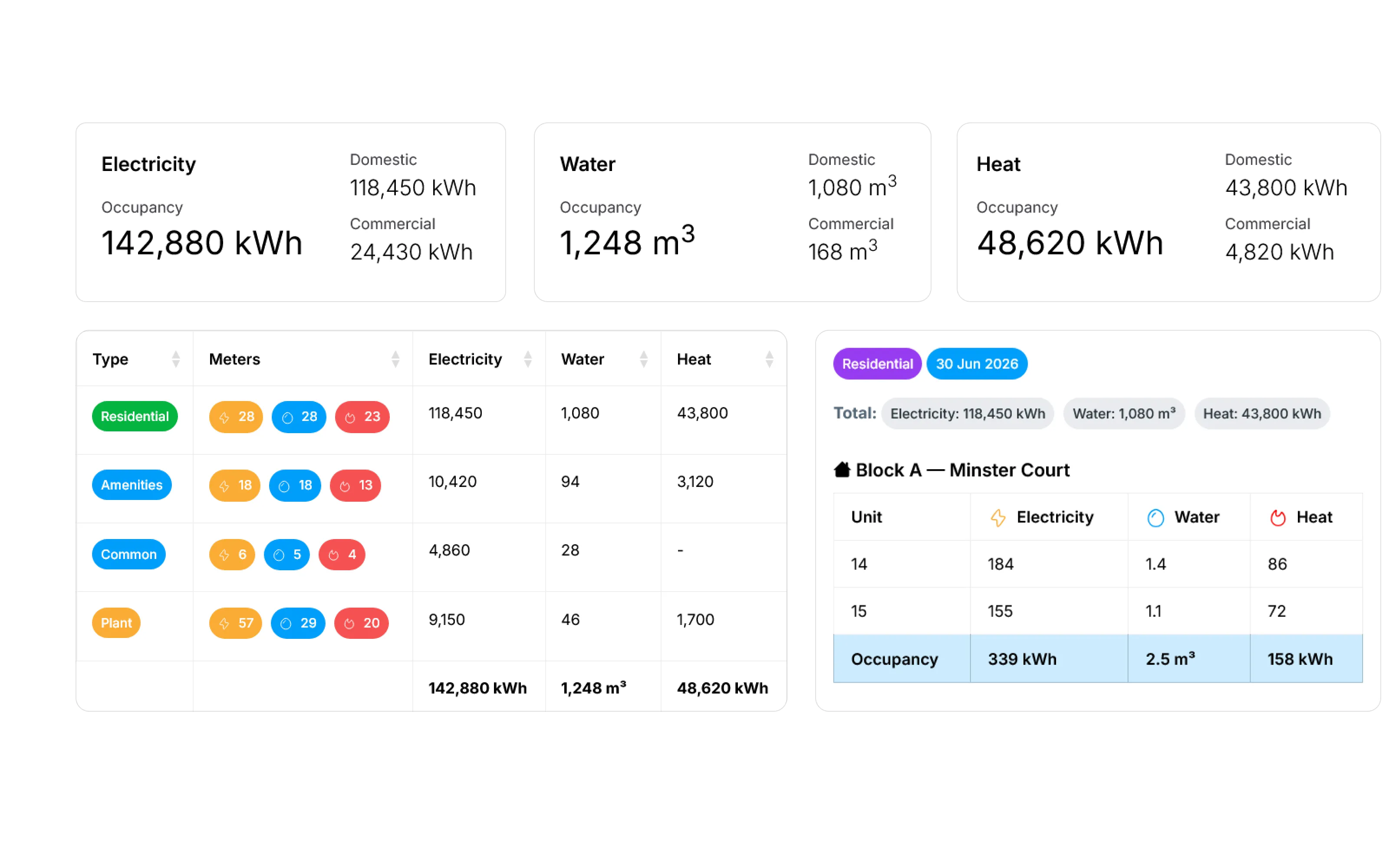
Review electricity, water, and heat consumption by property type, meter group, and individual unit. Compare portfolio totals with the readings behind them before preparing utility charges.

Electricity, water, and heat consumption totals, meter counts, and unit readings for Minster Court

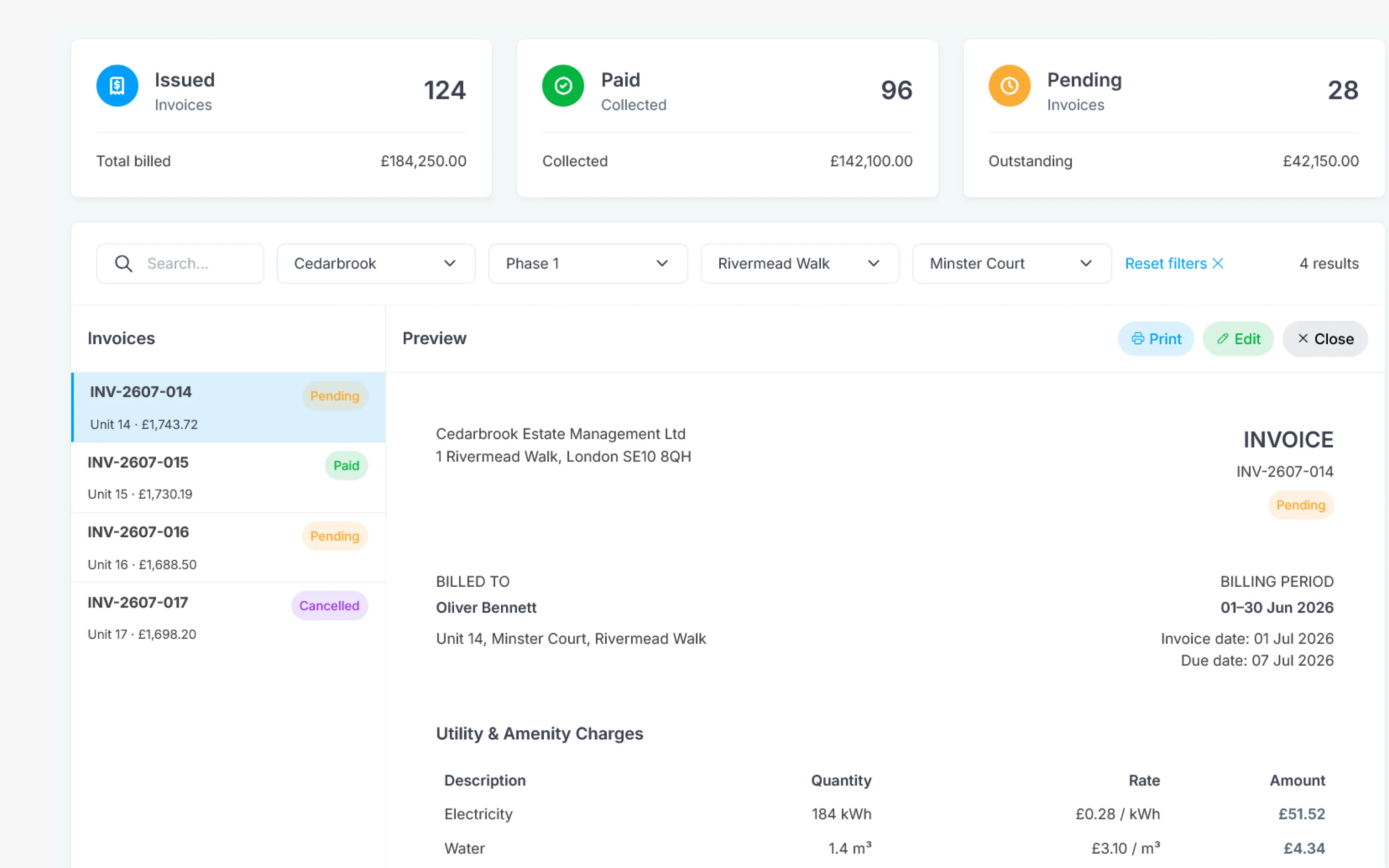
02Invoice workspace

Review individual utility invoices in context.

Filter invoice records by project and property, then open each invoice alongside its billing period, resident, utility charges, quantities, rates, amount, and payment status.

Invoice workspace with filtered invoice records and a preview of a pending utility invoice for Unit 14

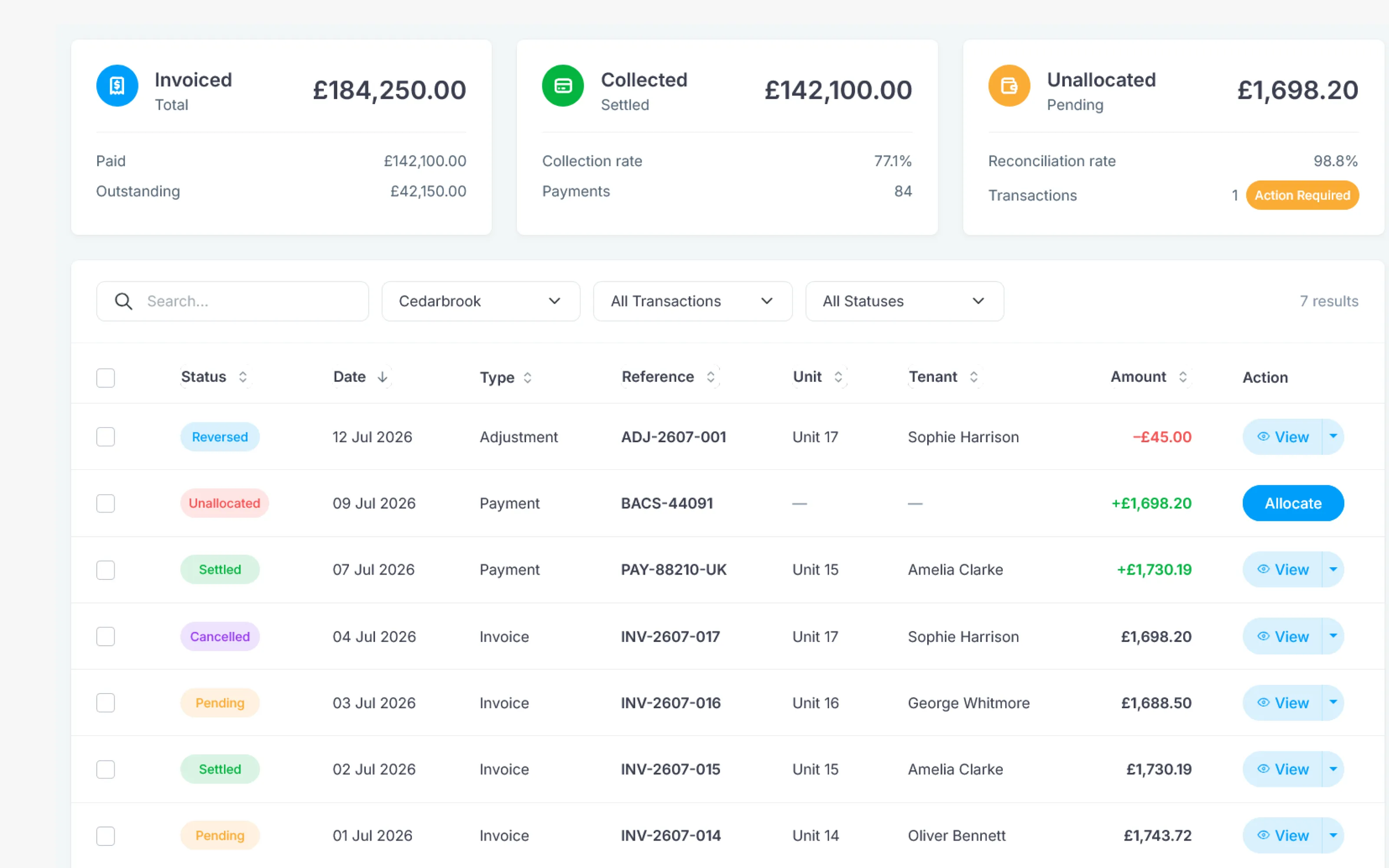
03Payment reconciliation

Match incoming payments and surface exceptions.

Import bank transactions through API or CSV and automatically match them against resident accounts and outstanding invoices. Confirm successful allocations, review unmatched transactions, and keep collection and debt positions current as payments are processed.

Payment and invoice ledger with statuses, amounts, and an unallocated bank payment requiring action

Ready to change how your operations work?Make your next moveBook Discovery Call

Start with the operation you have today. Together, we will identify the most useful next step.

Connected service operations

From first message to final resolution, keep every issue in context.

Bring resident conversations, maintenance tickets, and team activity into one traceable process. Configure how work is classified and handled, preserve the complete service history of every property, and use historical data to identify recurring operational problems.

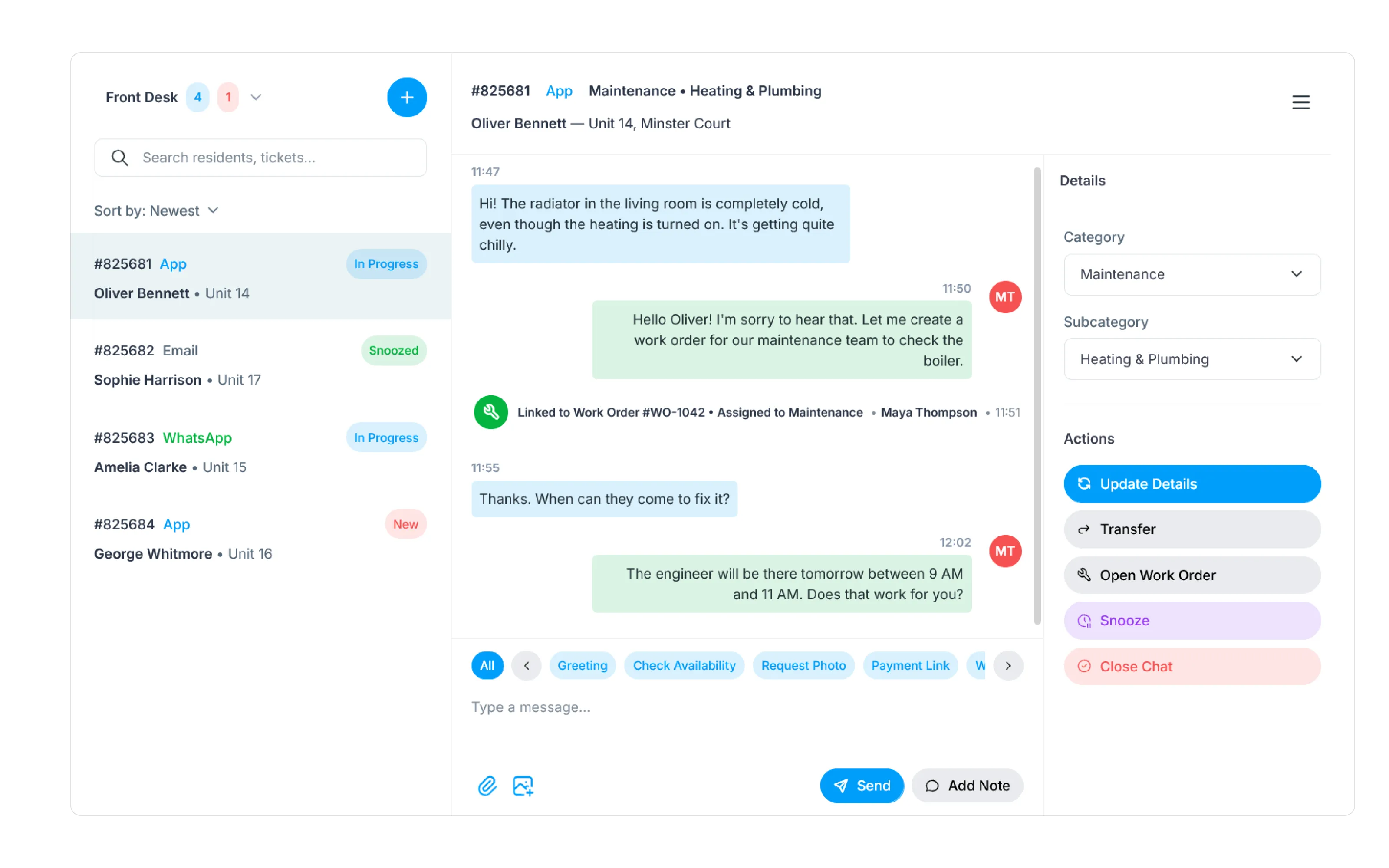
01Register resident requests

Receive every resident request in one workspace.

Receive and register requests from the resident mobile app, messaging apps, and email in a single operator inbox. Keep each conversation connected to the relevant resident and property, so teams can respond, record the issue, and decide whether it needs further action.

Front Desk inbox showing a resident's cold-radiator conversation, linked to a maintenance work order for Unit 14

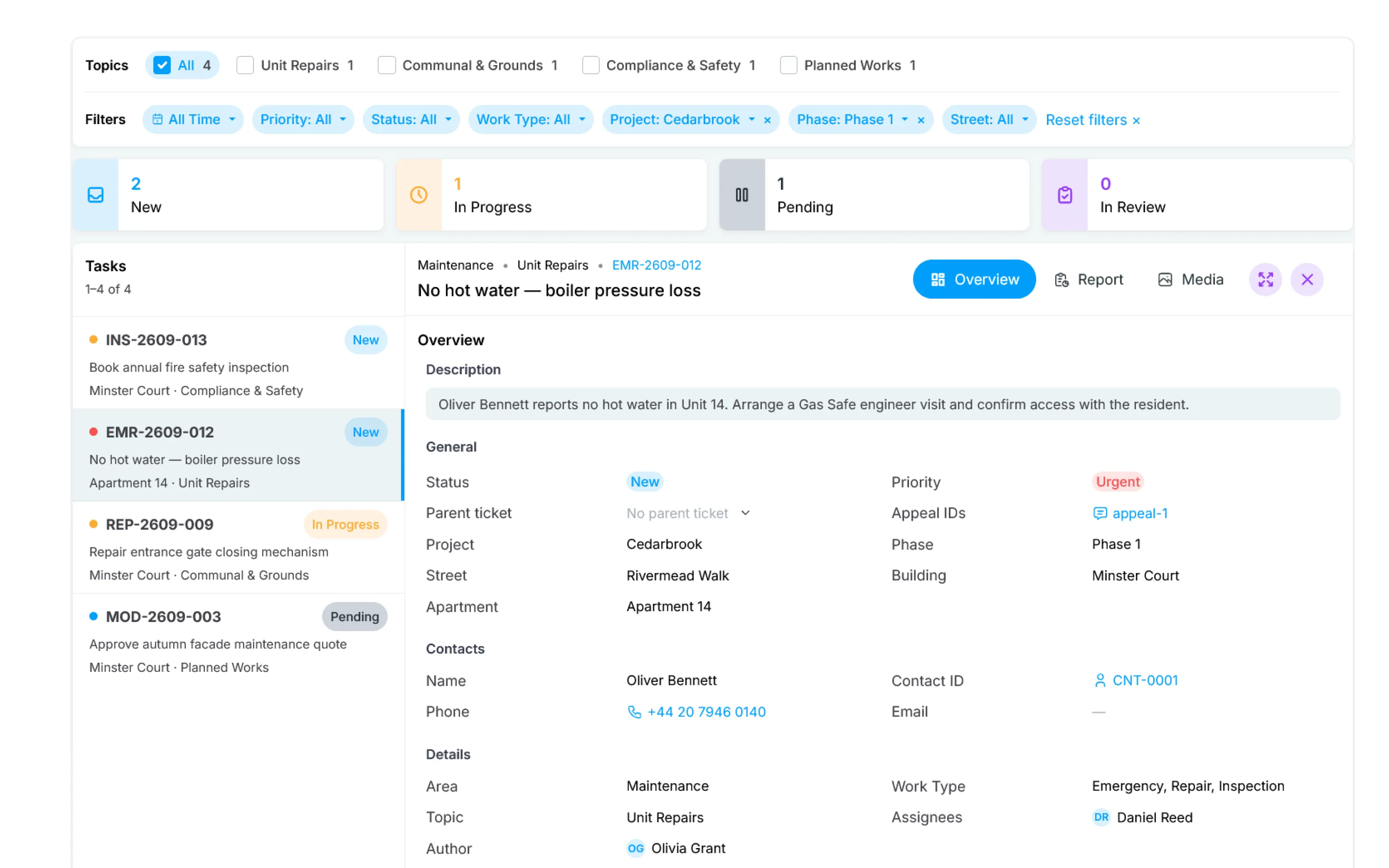
02Escalate to a service ticket

Assign every ticket and follow it through.

When a request needs action, create a service ticket, assign it to the responsible person, and follow it through to completion. Filter the ticket list by topic, priority, status, work type, and property, with each task retaining its resident, property, assignee, and work details.

Maintenance task workspace with filters, ticket status counts, and details of an urgent no-hot-water repair for Apartment 14

03Resolved case history

Keep a complete history of resolved cases.

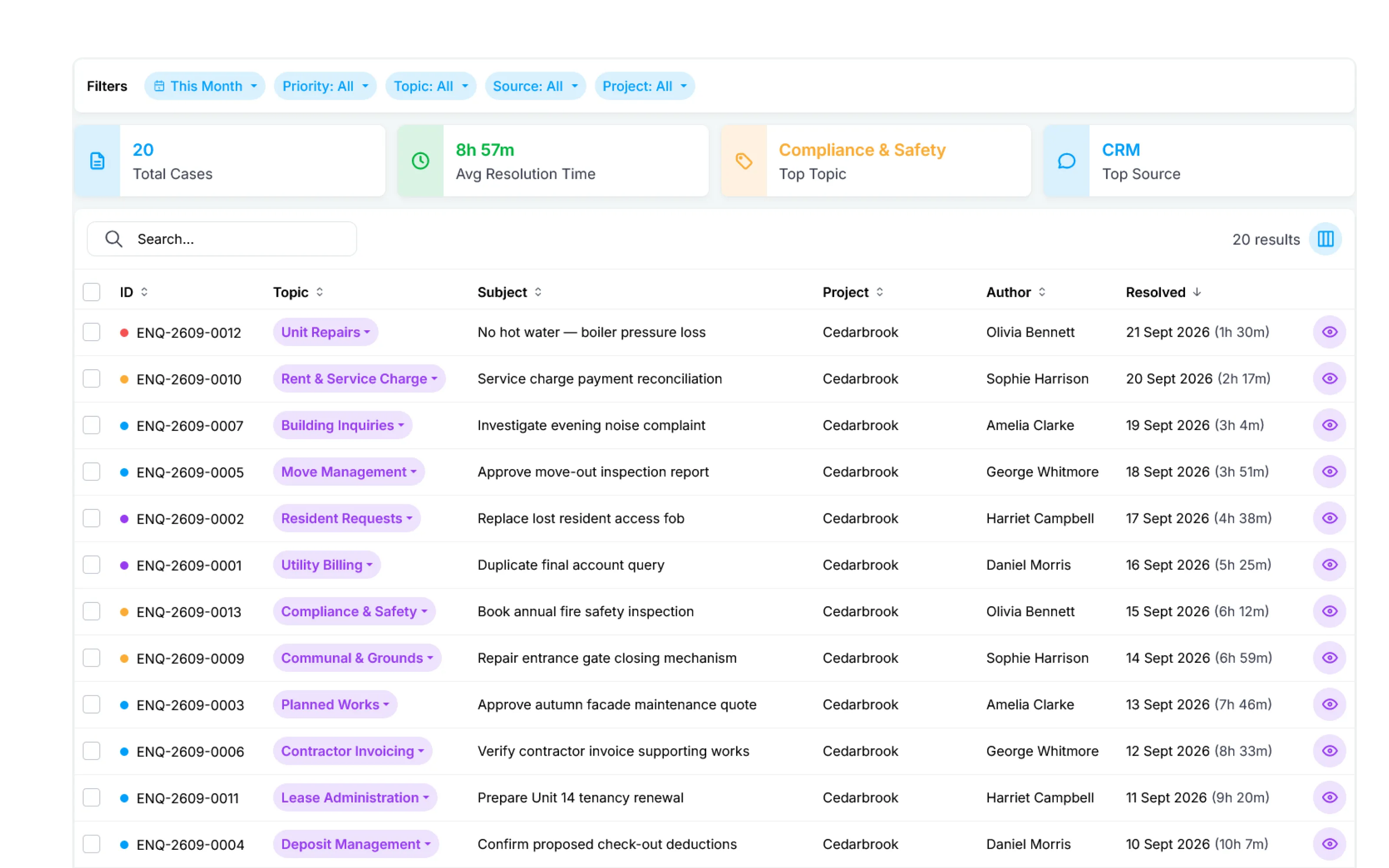
Review the complete history of resolved cases by timeframe, priority, topic, source, and project, with a short summary of the current selection. A separate analytics dashboard provides deeper breakdowns by resident, project, topic, and case status, including incoming and resolved cases, tickets created from requests, and resolution time.

Resolved case history filtered to this month, with 20 cases, average resolution time, top topic and source, and a list of completed requests

Platform capabilities

Core capabilities for complex residential operations.

Elastrum connects project structure, resident administration, utility billing, communications, maintenance, and inventory in one operational environment, keeping every record attached to the context it belongs to.

  1. 01

    Project architecture

    Choose a two-, three-, or four-level hierarchy for each project and rename every level to match the property structure and terminology your teams already use.

  2. 02

    Residents & agreements

    Manage resident profiles, occupancy changes, active agreements, and historical records. Each relationship remains traceably linked to the relevant property and project context.

  3. 03

    Metering & readings

    Connect meters to the relevant property levels, capture electricity, water, and heat readings, validate consumption before billing, and retain a complete usage history.

  4. 04

    Tariffs & invoicing

    Configure tariff rules for each project and service, generate utility invoices in bulk, and keep every charge linked to its underlying readings and calculations.

  5. 05

    Resident support & alerts

    Process requests through a unified inbox and send targeted updates through the resident app or messaging bots, keeping every conversation connected to the relevant property.

  6. 06

    Warehouse & inventory

    Track materials, spare parts, and available stock, then link issued inventory to the maintenance ticket, contractor, and property where it is used.

AI Copilot · Optional premium module

AI built around your operating model - not a generic chatbot.

Elastrum’s AI Copilot is configured with each client rather than switched on out of the box. Together, we define its authorised data sources, RAG knowledge templates, response rules, and escalation paths. Once implemented, it can handle approved routine resident enquiries and analyse operational history within the context of your projects.

Configuration and commercial terms are scoped individually around your portfolio, integrations, support requirements, and expected usage.

Product evaluation

What to know before implementation.

Answers about project configuration, billing traceability, data migration, integrations, optional modules, and commercial scope.

Yes. Each project can use one of three hierarchy presets: Building → Apartment, Phase → Building → Apartment, or Stage → Phase → Building → Apartment. Level names can be adapted to your terminology, while the required structures and migration mappings are validated during discovery.

See your workflow in context

Ready to discuss your project?

You don't need a perfect plan to start. Simply describe the roadblocks in your daily operations, and we’ll guide you in building a unified, scalable digital workflow.

* Indicates a required field.